
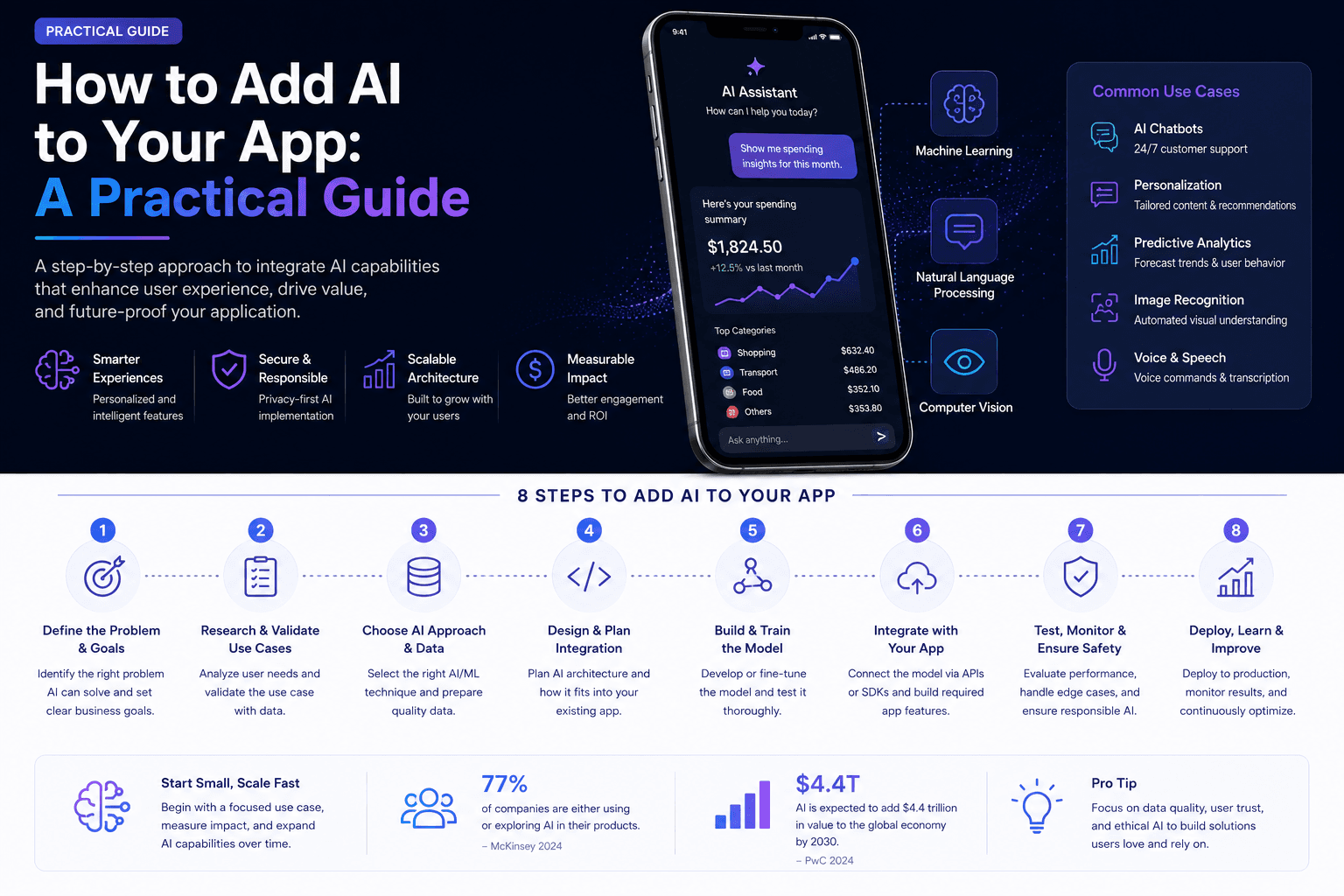
Learning how to add AI to your app doesn’t require a full platform rebuild; most AI features can be layered onto an existing product incrementally, starting with a focused use case rather than an ambitious AI-everything overhaul. Businesses exploring AI development for the first time often assume adding AI means a ground-up rearchitecture, when in reality thoughtful integration usually works better as a series of targeted additions. This guide walks through a practical approach to adding AI capabilities to a product you’ve already built.
Step 1: Identify a Genuine User Problem AI Can Solve
The most successful AI features address a real friction point in your existing product, rather than being added because AI is expected or trendy.
Look for Repetitive Manual Tasks
Tasks users currently do manually and repeatedly within your app — searching, categorizing, summarizing — are often strong candidates for AI-powered automation that genuinely saves user time.
Consider Where Users Currently Struggle
Points in your user journey where users commonly get stuck or abandon tasks may benefit from AI assistance, whether through better search, guidance, or automated suggestions.
Avoid AI for AI’s Sake
Adding AI features without a clear user benefit tends to result in low adoption and wasted development investment, so start from the user problem, not the technology.
Step 2: Choose the Right AI Capability for Your Use Case
Different AI capabilities suit different problems, and choosing the right one for your specific use case matters more than which is currently most talked about.
Conversational AI & Chatbots
If your use case involves answering questions or guiding users through a process, a conversational interface grounded in your product’s data may be the right fit. Our AI chatbot development services cover this use case in depth.
Recommendation & Personalization
If you have behavioral data and want to surface more relevant content or products, recommendation systems can meaningfully improve engagement without requiring conversational interfaces.
Automation & Document Processing
If your use case involves repetitive data extraction or processing tasks, automation-focused AI may deliver more value than a conversational interface for that specific job.
Step 3: Start Small and Prove Value
Rather than attempting a comprehensive AI feature set immediately, a focused initial implementation lets you validate value before expanding scope.
Build a Narrow, Well-Defined First Feature
Choosing one specific, well-bounded use case for your first AI feature makes it easier to build well and measure whether it’s actually delivering value to users.
Set Clear Success Metrics Upfront
Define specific metrics for what success looks like before building, whether that’s task completion time, engagement, or reduced support tickets, so you can objectively evaluate the feature’s impact.
Plan for Human Review Where It Matters
For AI features making consequential decisions or handling sensitive tasks, build in human review checkpoints rather than assuming full automation from day one.
Step 4: Integrate Without Disrupting Your Existing Product
AI features generally work best as an enhancement to an existing product, not as a jarring bolt-on that feels disconnected from the rest of the experience.
Ground AI Responses in Your Actual Data
Where possible, connect AI features to your own product data and documentation rather than relying purely on generic model knowledge, improving relevance and accuracy significantly.
Maintain Consistent Design Language
AI features should feel like a natural part of your existing product, using consistent design patterns rather than looking like a separate tool awkwardly attached to your interface.
Step 5: Monitor, Learn, and Iterate
AI features typically need ongoing refinement based on real usage patterns, rather than being perfected once and left alone.
Track Usage & Quality Metrics
Ongoing monitoring of how the AI feature is actually used, and how often it produces genuinely helpful versus unhelpful responses, guides where refinement effort should focus.
Expand Based on Validated Success
Once your initial AI feature proves valuable, expanding scope to additional use cases becomes a much lower-risk decision, informed by what you learned from the first implementation.
FAQs
Do I need to rebuild my app to add AI features?
No, most AI features can be added incrementally to an existing app through API integrations and targeted new components, without requiring a full rearchitecture of your existing product.
How much does it typically cost to add a basic AI feature?
Cost varies based on complexity and how much custom integration with your existing data is required, but a focused first AI feature is generally more affordable than businesses initially expect.
Should I build my own AI model, or use an existing API?
For most business use cases, using an existing AI API like OpenAI’s is more practical and cost-effective than training a custom model, unless you have very specific, large-scale, or specialized needs.
How do I know if an AI feature is actually working well?
Define specific success metrics before launch, whether related to engagement, task completion, or user satisfaction, and monitor these consistently rather than relying on general impressions alone.
What’s the most common mistake businesses make adding AI?
Building an AI feature without first validating that it addresses a genuine user problem, resulting in low adoption despite the technical investment involved in building it.
Can AI features be added to a mobile app, or only web platforms?
Yes, AI features can be integrated into both mobile and web platforms, though the specific implementation approach may differ slightly based on platform constraints and user interaction patterns.


