
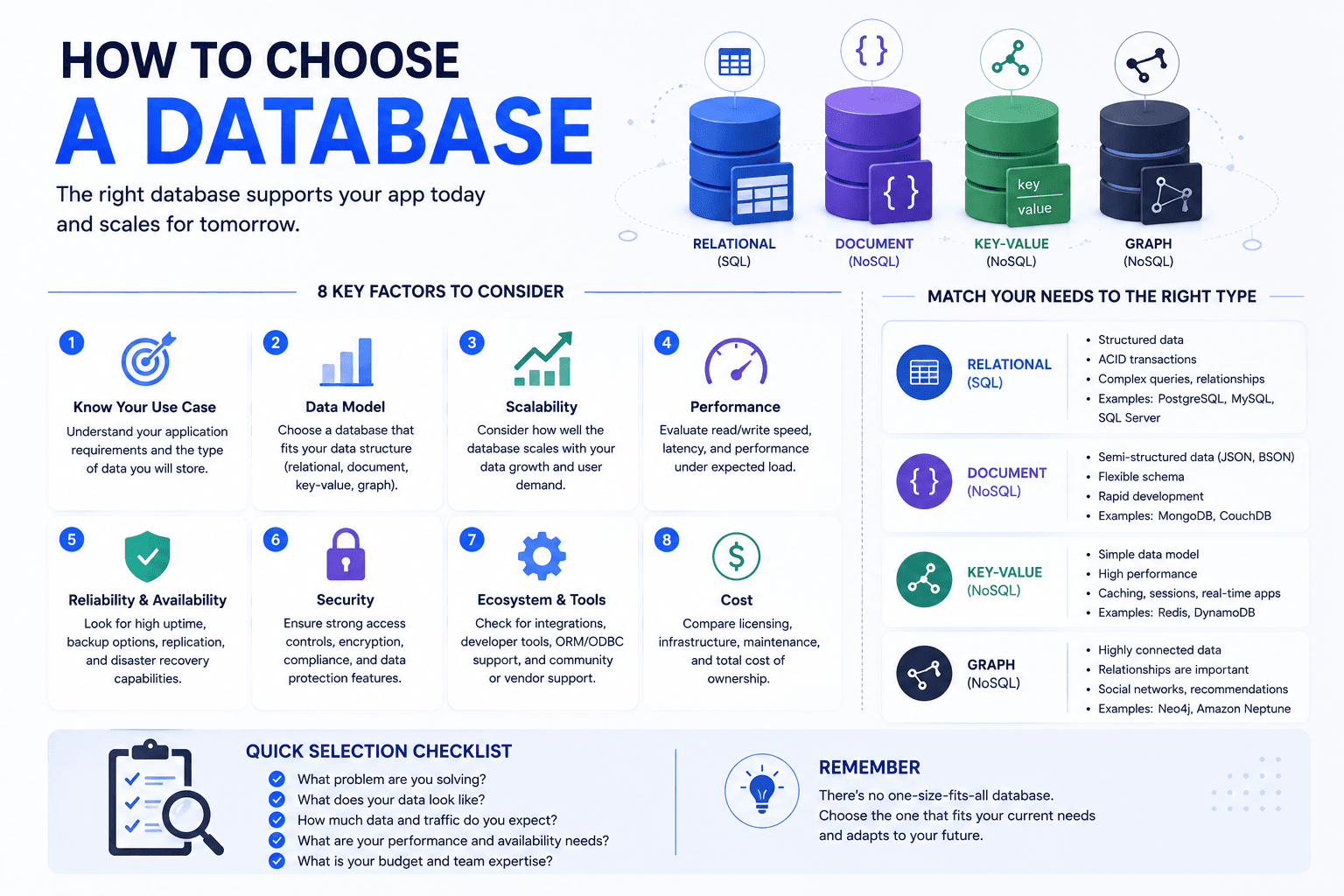
Choosing a database is a decision teams usually make from familiarity and then live with for years, because migrating a production database is among the least appealing projects in software. The choice should instead follow from how your application reads and writes data, what consistency it genuinely requires, and who will operate it. This guide sets out the criteria that actually discriminate between options, points to detailed comparisons for each shortlist, and covers when running more than one is justified.
Starting From Access Patterns, Not Data Structure
The common starting question, whether your data is structured or unstructured, is less useful than it sounds, since almost all business data has structure. The productive question is how you will read it. Systems that retrieve complete records by identifier suit different stores from those running aggregate queries across many rows, and those differ again from systems where relationships between entities are the primary thing being queried. Establishing your dominant read patterns narrows the field faster than examining the data itself.
Identifying Dominant Read Patterns
Determine whether you mostly fetch single records, filter across many, or traverse relationships. This distinction discriminates between database families more sharply than data shape does.
Assessing Write Volume and Shape
High-frequency small writes, bulk loads, and occasional updates place different demands. Write patterns influence choice as much as reads and are more often overlooked.
Understanding Relationship Complexity
Data with many interconnections queried in combination favours relational models. Comparing SQL and NoSQL approaches against your join requirements resolves much of the question.
Separating Analytical From Operational Needs
Reporting queries scanning large volumes behave differently from transactional lookups. Running both on one store frequently degrades the transactional path.
Expecting Query Patterns to Change
Applications evolve, and stores optimised narrowly can become constraining. Relational databases generally accommodate unanticipated queries better than heavily denormalised alternatives.
Deciding What Consistency You Actually Require
Consistency requirements are routinely overstated, and the cost of that overstatement is either unnecessary complexity or unnecessary limitation. Financial transactions genuinely need strong guarantees. A feed of activity updates does not, and treating it as though it does forecloses simpler architectures. Being honest about which parts of your system require strict correctness and which tolerate brief divergence is what allows appropriate choices rather than uniformly cautious ones.
Identifying Transactional Requirements
Where multiple related changes must succeed or fail together, transactional guarantees are necessary. Relational systems provide these more straightforwardly than most alternatives.
Accepting Eventual Consistency Where Suitable
Many features tolerate brief inconsistency without user-visible harm. Recognising these permits architectures that scale more readily and cost less to operate.
Comparing Established Relational Options
Where relational is correct, the specific choice matters less than teams assume. Reviewing PostgreSQL and MySQL differences addresses most remaining questions.
Evaluating Document Store Trade-Offs
Document databases simplify some patterns and complicate others, particularly joins. The MySQL and MongoDB comparison covers where each holds up.
Considering Managed Service Differences
Operational characteristics vary substantially between hosted options. Comparing MongoDB and DynamoDB illustrates how managed models differ in practice.
Weighing Operational Capacity and Team Skills
The best-suited database is the wrong choice if nobody can operate it. Backups, upgrades, performance tuning, and incident response all require familiarity, and an unfamiliar system under pressure at three in the morning is a serious liability. This consideration weighs more heavily for small teams, where the person who chose the database is frequently also the person operating it, and it argues consistently for boring, well-understood options.
Matching Choice to Existing Expertise
A database your team already knows will be operated better than one they must learn. This advantage frequently outweighs technical fit differences.
Preferring Managed Services Where Possible
Managed offerings remove backup, patching, and failover work. For teams without dedicated operations capacity this is usually the correct default.
Considering the Hiring Market
Widely used databases have deeper talent pools. Unusual choices constrain hiring and make handover harder as the team changes.
Assessing Backup and Recovery Realistically
Confirm you can restore, not merely that backups exist. Untested recovery procedures fail when they are finally needed under time pressure.
Securing Operational Support
Where internal capacity is limited, access to experienced database developers matters more than the specific product selected.
Knowing When to Run More Than One
Using several databases for different purposes is legitimate and increasingly common, but each addition carries operational cost, another failure mode, and the ongoing problem of keeping data consistent between stores. The justification should be a genuine mismatch that one store cannot serve well, such as full-text search or caching, rather than a preference for using the right tool everywhere. Most applications need fewer stores than their architecture diagrams suggest.
Starting With One Store
A single well-chosen database serves most applications for a long time. Adding stores before there is a demonstrated need creates complexity without corresponding benefit.
Adding Search as a Distinct Concern
Full-text search performs poorly in general-purpose databases at scale. This is among the clearest justifications for a second store alongside the primary one.
Separating Analytics From Transactions
Reporting workloads scanning large volumes belong in a separate analytical store. Appropriate data warehousing prevents reporting queries degrading the operational path.
Using Caching Deliberately
An in-memory layer reduces load on the primary store, but it introduces invalidation problems. Add it when measurement shows the need rather than preemptively.
Managing Consistency Between Stores
Every additional store creates synchronisation obligations. Decide which is authoritative for each data domain before splitting anything across systems.
Frequently Asked Questions
Should I use SQL or NoSQL?
Start from your access patterns rather than the label. Relational suits data with meaningful relationships queried in combination, and accommodates unanticipated queries better. Document stores suit records retrieved whole with few joins. Most business applications fit relational comfortably.
Which database is best for a startup?
Usually a widely used relational database on a managed service, because it handles most workloads, accommodates changing requirements, and has the deepest talent pool. Optimising the choice before you understand your access patterns rarely pays off.
When should I use multiple databases?
When one store genuinely cannot serve a requirement well, most commonly full-text search or analytical reporting. Each additional store adds operational cost and synchronisation obligations, so the justification should be a demonstrated need rather than preference.
How important is the specific database product?
Less than the fit to your access patterns and your team’s ability to operate it. Among mature options in the same family, differences are modest, and operational familiarity typically matters more than the technical distinctions.
Can I change databases later?
Technically yes, practically it is one of the least pleasant projects in software, involving data migration, application changes, and a risky cutover. This is why the initial choice deserves attention proportionate to how long you expect the system to run.
Should I use a managed database service?
For most teams, yes. Managed services remove backup, patching, and failover work that otherwise requires dedicated operational capacity. Self-managing makes sense where you have that capacity and a specific reason to need the control.


