When your sales team worked in one office, a quick hallway conversation kept everyone aligned. “Hey, did you follow up with Acme Corp?” “I heard they’re also talking to our competitor.” “That lead from the conference — is anyone on it?”
Remote teams don’t have hallways. Information gets siloed in individual inboxes, Slack threads, and scattered spreadsheets. Deals fall through cracks nobody can see. Leads sit uncontacted because the assignment email got buried. A customer signals they’re unhappy — but the account manager works 3 time zones away and won’t see it until tomorrow.
CRM solves the information silo. AI solves the intelligence gap. Together, they make remote teams outperform co-located teams — because AI doesn’t take lunch breaks, forget to check email, or miss signals across time zones.
Why Remote Teams Need CRM More Than Anyone
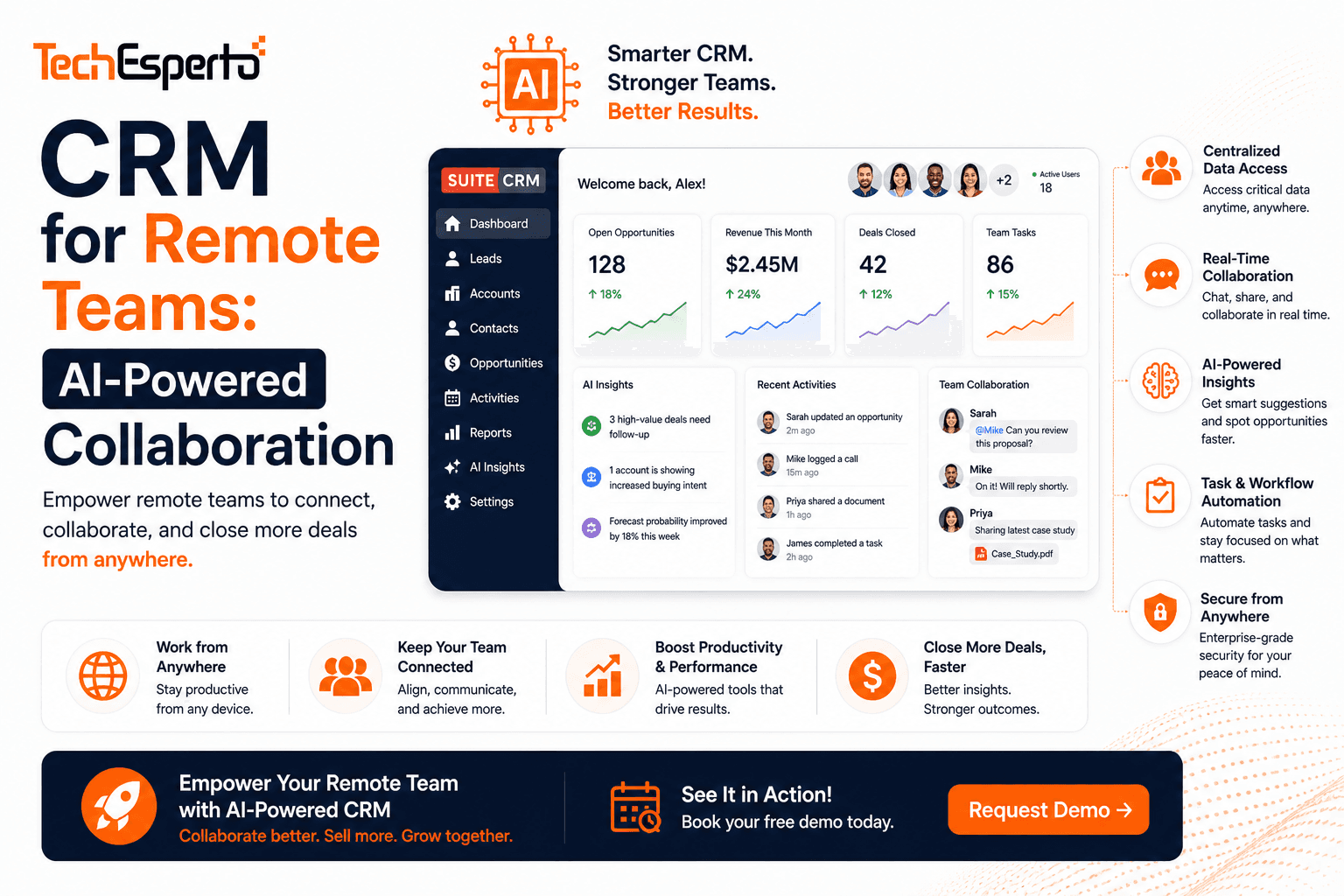
No shared context. In an office, you overhear conversations and absorb context passively. Remote teams have zero passive context. Every piece of information must be explicitly shared — and CRM is where it lives. A Contact record with complete interaction history replaces 50 hallway conversations.
No visibility. Managers can’t walk the sales floor. They can’t see who’s on the phone, who’s struggling, or whose deals are stalling. Dashboards and reports replace physical presence — showing pipeline health, activity volume, and deal progress in real time.
Time zone challenges. A lead comes in at 3 PM EST — but the assigned rep is in PST and just started lunch. Without automation, that lead waits 2+ hours. With workflow automation, the lead gets an instant acknowledgment email, a follow-up task, and — if uncontacted after 1 hour — reassignment to an available rep.
6 AI Features That Transform Remote CRM
1. AI Lead Scoring Across Time Zones
AI lead scoring assigns priority scores to every lead automatically — no manager intervention needed. A hot lead entering at 2 AM gets scored and routed to the first available rep in any time zone. Workflows assign based on score + rep availability + time zone overlap. No lead waits for morning.
2. AI Deal Risk Alerts
With co-located teams, a manager notices when a rep seems worried about a deal. Remotely, that signal is invisible. AI predictive analytics monitors every deal in the pipeline and flags at-risk opportunities with specific reasons on the dashboard — visible to managers regardless of where they are. Logic Hooks trigger instant notifications.
3. AI Email Assistant
Remote teams communicate more via email. AI drafts contextual responses, summarizes threads, and detects sentiment — saving each rep 2+ hours daily. When a customer sends a frustrated email at 11 PM, AI flags the sentiment immediately. The account manager sees the alert first thing in their morning, with a draft response ready.
4. AI Chatbot for 24/7 Coverage
Your website needs to capture leads across every time zone your customers operate in. An AI chatbot qualifies visitors, answers questions from your Knowledge Base, and creates Lead records in SuiteCRM — whether it’s 3 AM or 3 PM in any time zone.
5. Mobile CRM for Anywhere Access
Remote reps work from home offices, coffee shops, client sites, and airports. TechEsperto’s SuiteCRM Mobile App provides full CRM access on any device — contacts, pipeline, tasks, and real-time updates. Log a call from the parking lot. Update a deal from the airport. Check the dashboard from bed (we won’t judge).
6. AI Meeting Summarization
Remote teams have more video calls — and more action items get lost. AI connected to call recordings extracts key points, action items, and next steps — logging them directly in SuiteCRM Contact and Opportunity records. No manual note-taking. No “what did we decide in that call?”
Remote CRM Setup Checklist
Week 1: Install SuiteCRM on cloud hosting accessible from anywhere. Configure email with Google Workspace or Outlook. Set up Security Groups per team/region.
Week 2: Build role-specific dashboards. Create workflow automations for lead assignment, follow-ups, and time-zone-aware escalation. Connect Zapier/Make for Slack/Teams notifications.
Week 3: Deploy AI lead scoring and deal prediction. Configure AI email assistant. Set up AI chatbot for website.
Week 4: Train team remotely (video sessions by role). Go live. Monitor adoption via dashboards.
The Cost Advantage for Remote Teams
Remote-first companies are cost-conscious by nature — they save on office space, so they’re especially sensitive to per-user software costs. Salesforce at $165/user/month for 30 remote reps = $59,400/year. SuiteCRM with AI: $8,000–$25,000 first year, $3,000–$8,000 ongoing. Remote team savings go further with open-source CRM.
Ready to equip your remote team with AI-powered CRM?Contact TechEspertofor a free consultation.
FAQs
Q: Does SuiteCRM work well for remote teams? Yes. Cloud-hosted SuiteCRM is accessible from any browser, any device, any location. Mobile app adds native phone/tablet access.
Q: How do we handle time zone differences? AI + workflows handle time zones automatically — lead routing by availability, follow-up scheduling by recipient timezone, and escalation when leads go uncontacted.
Q: Can AI really replace hallway conversations? Not the relationship part — but AI replaces the information part. Deal risk alerts, lead scoring, and email sentiment analysis surface insights that would otherwise require overhearing a conversation.
Q: What does remote CRM implementation cost? SuiteCRM + AI for a 20-person remote team: $15,000–$30,000 first year (including implementation, AI, and training). Year 2+: $3,000–$8,000.
Q: Can TechEsperto implement remotely? Yes — 100% of our implementations are remote. We serve 20+ countries via video calls, screen sharing, and async communication.Contact us →