
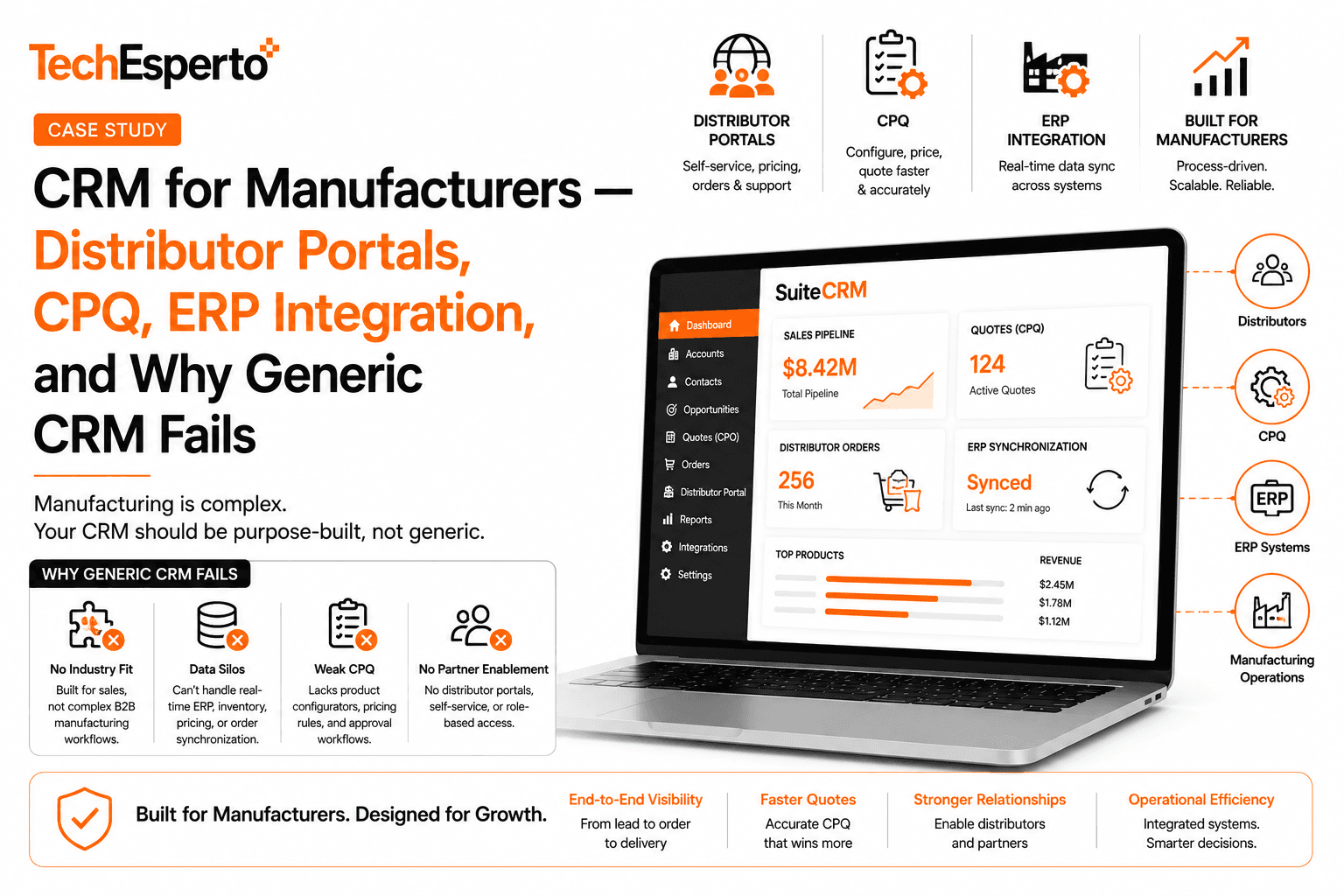
Manufacturing CRM selection looks deceptively simple on paper and turns into a hard problem in practice. The reasons aren’t obvious from generic CRM evaluation criteria. They become obvious about six months into a deployment that was supposed to work and doesn’t — when inside sales is still building quotes in Excel because the configured CRM can’t handle the product complexity, when dealers can’t self-serve because the portal that was promised doesn’t actually integrate with the order workflow, when the operations team is reconciling CRM and ERP data weekly because the integration never quite landed.
The pattern that fails: manufacturers buying CRM as if it’s just sales pipeline tracking. The pattern that works: manufacturers buying CRM as if it’s the operational layer that orchestrates dealer relationships, product configuration, quote-to-order, and ERP integration.
This guide walks through what manufacturing operations leaders, sales VPs, and IT directors should evaluate when choosing CRM for a manufacturing business. It draws on deployments across industrial equipment, automotive components, building products, electronics, and specialty manufacturing — including the mid-size manufacturer case study where SuiteCRM was built with custom CPQ, distributor portal, and ERP integration that cut quote turnaround from 5 days to 4 hours.
If you’re at a manufacturer evaluating CRM options, this is the framework that surfaces the questions that actually determine success.
Why Manufacturing CRM Is Different
Three structural differences separate manufacturing CRM requirements from CRM in other industries.
Difference 1: The CRM lives alongside the ERP, not in place of it.
In most industries, the CRM is the system of record for customer relationships and the primary operational platform. In manufacturing, the ERP holds the system of record — inventory, production schedules, BOM, financials, order fulfillment. The CRM handles everything around it: dealer relationships, lead capture, configuration, quoting, opportunity pipeline, marketing automation, and the customer-relationship layer that connects sales to fulfillment.
This architectural reality means the CRM-ERP integration is often the highest-risk technical decision in the project. Get it wrong and the CRM either holds stale data (limiting usefulness) or creates duplicate state management that consumes operations capacity to reconcile.
Difference 2: Selling through distributors changes everything.
Most manufacturers sell through distributor or dealer networks rather than direct to end customers. This isn’t a small architectural detail — it changes the entire CRM workflow. The dealer is your customer for relationship purposes. The end customer is the dealer’s customer. Both need to be tracked. Pricing varies by dealer tier. Self-service for dealers can dramatically reduce inside-sales workload. Without distributor-aware workflows, the CRM becomes a list of contacts rather than an operational platform.
Difference 3: Products are configurable, and configuration rules are complex.
A B2B SaaS company sells one product with three tiers. A typical industrial manufacturer sells 200+ base SKUs, each with 10–20 configurable options, with compatibility rules between options that the engineering team understands implicitly. CPQ (configure-price-quote) in manufacturing isn’t a feature — it’s the core sales workflow that determines whether quotes go out in hours or days.
For broader context, see our Manufacturing CRM solutions page and the existing SuiteCRM for Manufacturing blog.
The 7 Decision Criteria That Actually Matter
Surface-level CRM features look similar across vendors. The differences that determine whether a manufacturing deployment succeeds or fails sit in the seven criteria below.
Criterion 1: CPQ Architecture That Matches Product Complexity
For manufacturers with configurable products, the CPQ engine determines whether quotes are fast and accurate or slow and error-prone. Most generic CRM platforms include some configuration capability, but real manufacturing CPQ requires architectural depth most CRMs don’t have out of the box.
What to evaluate:
- Configuration rules engine — can the CPQ enforce compatibility rules (Option A requires Option B, excludes Option C)?
- Pricing logic — base price, tier discounts (4+ pricing tiers across distributors), volume discounts, promotional pricing, custom pricing approval workflows
- Multi-line quote builder — products with parent-child line item relationships (main unit + sub-assemblies + options + accessories)
- Effective dating — pricing and configuration rules that change over time, with historical accuracy for warranty and recall scenarios
- Quote document generation — branded PDFs matching your existing quote format, with revision tracking
- Approval workflows — non-standard pricing routes to appropriate manager
- E-signature integration — DocuSign or equivalent for quote acceptance
The CPQ build in our manufacturing case study required ~5 weeks of dedicated engineering plus 40 hours of engineering team collaboration to capture configuration rules. Generic CRM platforms either constrain you to off-the-shelf CPQ tools (Salesforce CPQ at $75/user/month, Oracle CPQ at higher rates) or require custom development that’s expensive on closed platforms.
See our SuiteCRM Development service and SuiteCRM Customization Complete Guide for technical patterns.
Criterion 2: Distributor Portal With Real Self-Service
For manufacturers selling through dealer networks, the distributor portal is where the operational economics either work or break. A well-designed portal shifts 50–70% of routine work from inside-sales to dealer self-service. A poorly-designed portal (or no portal) keeps everything on inside-sales and constrains how much dealer network you can support per inside-sales rep.
What to evaluate:
- Dealer-specific product visibility — some product lines restricted to specific dealer tiers
- Dealer-specific pricing display — final pricing reflects their tier, volume discounts, promotions
- Self-service quote builder — using the CPQ engine, with dealer pricing automatically applied
- Order placement workflow — direct ordering from approved quotes within dealer credit limits
- Order status tracking — placement through fulfillment, visible to the dealer
- Marketing assets and co-op program management
- Performance reporting — dealer-specific sales reporting, year-over-year comparisons
- Branded experience — feels like your portal, not generic CRM
In the manufacturing case study, 60% of routine orders moved to dealer self-service within 12 months of portal launch, freeing inside sales for higher-value work and absorbing 30% dealer network growth without adding inside-sales headcount.
For our service approach to web applications and customer portals, see Web App Development service.
Criterion 3: ERP Integration Realism
The CRM-ERP integration is the highest-risk technical work in most manufacturing CRM projects. Vendors that gloss over this section of their proposal are vendors with hidden risk.
Specific questions to ask:
- Which ERPs have they integrated with previously? SAP, Oracle, NetSuite, Microsoft Dynamics 365, Epicor, Infor, Sage, Acumatica, IFS all have different API patterns
- Customer master sync — direction, frequency, conflict resolution
- Pricing data sync — base pricing in ERP, tier and promotional pricing in CRM, reconciliation between them
- Inventory visibility — real-time queries vs. cached values, what happens when ERP is slow
- Order handoff — confirmed quotes converting to ERP orders with acknowledgment back
- Order status sync — ERP-side status changes flowing to CRM for sales visibility
- AR status visibility — customer credit status from ERP visible in CRM, affecting new quote workflows
- Commission data flow — ERP transactions back to CRM for dealer commission attribution
The middleware approach we use isolates the CRM from ERP-side API quirks — a thin service layer between CRM and ERP that handles authentication, retries, error logging, and data transformation. Direct integrations against imperfect ERP APIs often produce reliability problems that consume operations team time forever after.
See our SuiteCRM Integration service, CRM Integration Guide, and SuiteCRM REST API Guide for the technical patterns.
Criterion 4: Dealer Relationship and Territory Management
Manufacturers with distributor networks need CRM that handles dealer relationships explicitly, not as generic accounts. Dealer performance, territory assignments, program participation, and relationship history all need first-class treatment.
What to evaluate:
- Dealer master records with multi-location structure (parent dealer + branch locations)
- Dealer tier classification — Tier 1/2/3/4, premier/preferred/standard, however your structure works
- Territory assignment rules — geographic, vertical-specific, named-account
- Dealer performance tracking — sales volume, growth, mix, year-over-year
- Program participation — co-op marketing, training certifications, demo programs
- Dealer principal and rep contact management — who’s who at each dealer
- Communication history — calls, visits, emails by dealer
- Dealer onboarding workflow — new dealer setup with appropriate provisioning
A dedicated dealer relationship management capability is often the difference between a CRM that grows your dealer network systematically and a CRM that lets dealer relationships atrophy because nobody owns them.
Criterion 5: Multi-Region Sales Operations
Manufacturers above small-business scale typically operate across multiple regions — North America, Europe, Asia, Latin America. CRM needs to handle multi-region sales operations without becoming three separate CRMs duct-taped together.
What to evaluate:
- Multi-currency — sales in local currency, reporting roll-up to functional currency
- Multi-language interfaces — sales reps work in their language, marketing materials localized
- Region-specific pricing — pricing varies by region for legitimate reasons
- Tax handling — sales tax, VAT, GST per region with correct calculation and invoicing
- Region-specific compliance — GDPR for European operations, regional data residency
- Cross-region reporting consolidation — leadership needs global views, regional managers need their own
- Region-specific workflow rules — what counts as an approved discount varies by region
For broader context across our regional service capability, see our services pages by geography and the related geo pages for USA, UAE, Australia, Canada, and Singapore.
Criterion 6: Forecasting and Pipeline Accuracy
Manufacturers that hit their revenue plan within ±10% have forecasting infrastructure. Manufacturers that miss by 20%+ have forecasting based on rep optimism. The CRM either supports forecast discipline or it doesn’t.
What to evaluate:
- Stage definitions with required-field validation — can’t progress without specific data captured
- Deal close-date discipline — close dates are realistic, not perpetually slipping
- Forecast roll-up across regions and dealers — sales leadership sees the aggregated picture
- Forecast accuracy tracking — how often does the actual outcome match the forecast 90 days prior?
- Pipeline composition analysis — is the pipeline weighted appropriately by stage and probability?
- Win/loss analysis — what’s working, what’s losing, by product, by region, by dealer
In the manufacturing case study, forecast accuracy improved from ±30% to ±12% within 12 months — driven primarily by CPQ-validated opportunity values and improved stage discipline, not advanced AI. Better data discipline beats fancy forecasting algorithms.
Criterion 7: Total Cost of Ownership That Scales With Your Network
Manufacturer CRM cost is shaped less by internal team size and more by dealer network size and product complexity. Both can scale fast. CRM cost structure that scales with both can quickly consume margin.
What to evaluate:
- Per-user pricing structure — does it apply to dealers using a portal? Some platforms count portal users; others don’t. Salesforce CPQ Plus + Experience Cloud quotes for a 40-dealer manufacturer can exceed $200K/year quickly
- CPQ pricing model — per-user, per-quote, flat? Salesforce CPQ adds $75/user/month
- Customization cost — generic CRM with custom CPQ build vs. closed CPQ tool with platform constraints
- Integration platform fees — MuleSoft, Boomi, or equivalent for ERP integration on enterprise platforms
- Implementation cost — typically $100K–$500K+ for enterprise manufacturer deployments on Salesforce
- Ongoing customization — manufacturing changes (new products, new dealer programs, new pricing structures) need CRM updates
The Salesforce Hidden Costs Calculator handles TCO math for Salesforce comparisons. The SuiteCRM Pricing Complete Guide covers the alternative cost structure.
Why Off-the-Shelf Salesforce Manufacturing Cloud Often Underperforms
Salesforce Manufacturing Cloud is the default enterprise option for mid-market and enterprise manufacturers. It works well for some organizations — typically large established manufacturers with internal Salesforce competence and budget tolerance for high licensing.
For most mid-market manufacturers ($50M–$500M revenue, 40+ dealers, configurable products), Manufacturing Cloud underperforms its alternatives for four reasons.
Reason 1: Per-user pricing math breaks fast with dealer networks.
Manufacturing Cloud requires Sales Cloud licensing per internal user, CPQ licensing for users handling configuration, Experience Cloud licensing for the dealer portal. For a 30-internal-user manufacturer with 40 dealers each having 3 portal users, the licensing math runs $300K+/year before any add-ons or implementation.
Reason 2: CPQ customization is expensive on Salesforce.
Manufacturers with complex configuration rules often outgrow Salesforce CPQ’s out-of-box capability. Customization either requires APEX development (expensive, vendor-locked) or working around platform limits. We’ve audited several “Salesforce CPQ” deployments where teams were maintaining shadow Excel-based quote tools because the CPQ couldn’t handle their actual product complexity.
Reason 3: ERP integration costs compound.
Real ERP integration on Salesforce typically requires MuleSoft (or another integration platform) at $50K+/year ongoing, plus implementation costs. On open-source platforms, the same integration runs through middleware that doesn’t carry platform fees. For broader analysis, see Salesforce Hidden Costs breakdown.
Reason 4: Vendor lock-in deepens as customization grows.
Once a manufacturer is deeply customized on Manufacturing Cloud — with custom CPQ rules, custom dealer workflows, custom ERP integration — switching costs become prohibitive. Salesforce knows this and prices accordingly. The 8% annual list price increases that look manageable in year 1 become budget-breaking by year 5.
For broader comparison context, see SuiteCRM vs Salesforce and Salesforce Renewal Decision framework.
What Good Manufacturing CRM Looks Like in Practice
The mid-size manufacturer case study covers what good manufacturing CRM looks like operationally. Quick summary of outcomes from a 40-dealer industrial equipment manufacturer, 16 months post-launch:
- Quote turnaround reduced from 5 days to 4 hours through CPQ automation and distributor self-service
- 60% of routine orders moved to dealer self-service portal, freeing inside-sales for higher-value work
- ERP-CRM reconciliation overhead eliminated (previously 8–12 hours per week)
- Distributor network grew from 40 to 52 dealers without adding inside-sales headcount
- Forecast accuracy improved from ±30% to ±12% on 90-day pipeline
- Revenue from existing dealers grew approximately 18% in the 12 months post-launch — attributed largely to the portal making it easier to do business with the manufacturer
Implementation cost: $75,000 plus $5,500/month ongoing managed services. Compared to Salesforce Manufacturing Cloud + CPQ + Experience Cloud’s projected 5-year TCO of approximately $2.0M, the SuiteCRM deployment lands at approximately $420K over 5 years — saving approximately $1.6M while delivering equivalent functional capability with deeper customization.
Full architecture and outcome detail in the manufacturing CRM case study.
Vendor Evaluation Checklist
When evaluating manufacturing CRM vendors, ask each candidate the same questions and compare responses.
CPQ and configuration:
- Walk us through how your CPQ would handle our specific product complexity
- Can configuration rules handle compatibility, exclusion, and required-option logic?
- How is dealer-tier and promotional pricing handled in the CPQ workflow?
- What’s the user experience for inside-sales reps building complex multi-line quotes?
Distributor portal:
- What does the dealer self-service experience look like end-to-end?
- How is dealer-specific product visibility and pricing managed?
- Can dealers place orders directly from approved quotes within their credit limits?
- What dealer onboarding workflow do you typically implement?
ERP integration:
- Which specific ERPs have you integrated with previously?
- What’s your integration architecture (direct, middleware, integration platform)?
- How does the integration handle ERP API failures gracefully?
- What’s the typical data sync cadence and how is conflict resolution handled?
Multi-region:
- How do you handle multi-currency, multi-language deployments?
- What about region-specific tax, compliance, pricing variations?
- How is cross-region reporting consolidated?
Total cost of ownership:
- What’s the year 1 cost broken down into licensing (internal users + portal users), implementation, ongoing support, infrastructure, integration platform fees?
- What’s the year 5 cost projection assuming our dealer network grows by X%?
- What add-ons become required as we add product lines or geographic regions?
For broader vendor evaluation framework, see How to Choose a SuiteCRM Partner and the Ultimate CRM Buying Guide for 2026.
Getting Started
If you’re evaluating manufacturing CRM options, three steps in order:
Step 1: Get clarity on your current state. Document what’s working — typical quote turnaround time, inside-sales workload distribution, dealer satisfaction patterns, ERP reconciliation overhead. The SuiteCRM Implementation Checklist — a free 16-page PDF — provides a structured audit framework.
Step 2: Quantify the cost of alternatives. Most manufacturers underestimate the cost of staying on enterprise CRM platforms (or the cost of doing nothing and continuing with fragmented systems). The free Salesforce Hidden Costs Calculator automates the TCO math for Salesforce comparisons.
Step 3: Get a candid second opinion. Book a free 30-minute strategy call — we’ll walk through your specific situation including product complexity, dealer network structure, ERP landscape, and budget framework, and give you an honest recommendation. No pitch, no commitment.
For deeper context, see our Manufacturing CRM solutions, the manufacturing case study, SuiteCRM for Logistics, SuiteCRM for Field Service, and broader CRM strategy content including Build vs Buy CRM and Pricing.
What’s the smallest manufacturer that should invest in a real CRM?
Roughly 5+ dealers and configurable products with more than 3–4 options per SKU. Below that scale, well-organized spreadsheets and a basic ERP integration can be adequate. Above that, the configuration complexity and dealer relationship management create CRM value capture opportunities that justify investment.
Do we need a dedicated CRM if we already have an ERP?
For most manufacturers above small-business scale, yes. ERPs handle production, inventory, and financials well. They handle sales pipeline, dealer relationships, marketing automation, configuration management, and pre-order workflows poorly or not at all. The CRM-ERP pairing is the dominant pattern across manufacturing for good reason.
Can we use generic Sales Cloud / HubSpot / Pipedrive for manufacturing?
Possibly, for very simple manufacturing operations. Once you have configurable products needing real CPQ, dealer networks needing portal access, or meaningful ERP integration, generic CRMs typically underperform. The cost of forcing a generic CRM to handle manufacturing workflows is usually higher than the cost of starting with manufacturing-appropriate architecture.
What’s the realistic timeline for a manufacturing CRM implementation?
Typically 12–18 weeks for mid-market manufacturer deployments including CPQ build, distributor portal, ERP integration, and training. Faster than that usually means CPQ scope was compressed. Longer than that usually means scope is broader or vendor isn’t efficient. The manufacturing case study ran 14 weeks from discovery through go-live.
Can the CRM replace our ERP?
No, and any vendor suggesting otherwise should be evaluated skeptically. ERPs handle regulated financial transactions, production planning, inventory management, and supply chain coordination with specific compliance requirements. CRMs handle relationship management, sales workflows, and customer-facing operations. They work alongside each other, not as replacements.
What about mobile apps for field sales reps?
Mobile CRM access is straightforward — most manufacturers’ field reps use mobile web access without needing native apps. For specific mobile needs (offline mode, barcode scanning, integration with field tools), native apps can be built. See our Mobile App Development service for the broader capability.
How does this work for service-focused manufacturers (field service, warranty)?
Field service is its own meaningful capability — work order management, technician dispatch, parts inventory, customer site visibility, warranty workflows. We’ve delivered CRM with integrated field service for several manufacturers. See SuiteCRM for Field Service blog for the broader approach.
What if we’re already on Salesforce Manufacturing Cloud and considering alternatives?
You’re in the same position as many manufacturers we’ve helped migrate — running per-user licensing that doesn’t scale with dealer network growth, plus CPQ constraints that force operational workarounds. The Salesforce Manufacturing Cloud migration path is similar to the standard Salesforce → SuiteCRM migration. See Salesforce → SuiteCRM Migration service, Salesforce Renewal Decision framework, and Migrate Salesforce to SuiteCRM Guide for 2026.
How do we get started?
Best starting point is the free 30-minute strategy call. We’ll walk through your product complexity, dealer network structure, ERP landscape, and budget framework — and give you a candid recommendation. No pitch, no commitment.
Frequently Asked Questions
Roughly 5+ dealers and configurable products with more than 3–4 options per SKU. Below that scale, well-organized spreadsheets and a basic ERP integration can be adequate. Above that, the configuration complexity and dealer relationship management create CRM value capture opportunities that justify investment.
For most manufacturers above small-business scale, yes. ERPs handle production, inventory, and financials well. They handle sales pipeline, dealer relationships, marketing automation, configuration management, and pre-order workflows poorly or not at all. The CRM-ERP pairing is the dominant pattern across manufacturing for good reason.
Possibly, for very simple manufacturing operations. Once you have configurable products needing real CPQ, dealer networks needing portal access, or meaningful ERP integration, generic CRMs typically underperform. The cost of forcing a generic CRM to handle manufacturing workflows is usually higher than the cost of starting with manufacturing-appropriate architecture.
Typically 12–18 weeks for mid-market manufacturer deployments including CPQ build, distributor portal, ERP integration, and training. Faster than that usually means CPQ scope was compressed. Longer than that usually means scope is broader or vendor isn’t efficient. The manufacturing case study ran 14 weeks from discovery through go-live.
No, and any vendor suggesting otherwise should be evaluated skeptically. ERPs handle regulated financial transactions, production planning, inventory management, and supply chain coordination with specific compliance requirements. CRMs handle relationship management, sales workflows, and customer-facing operations. They work alongside each other, not as replacements.
Mobile CRM access is straightforward — most manufacturers’ field reps use mobile web access without needing native apps. For specific mobile needs (offline mode, barcode scanning, integration with field tools), native apps can be built. See our Mobile App Development service for the broader capability.
Field service is its own meaningful capability — work order management, technician dispatch, parts inventory, customer site visibility, warranty workflows. We’ve delivered CRM with integrated field service for several manufacturers. See SuiteCRM for Field Service blog for the broader approach.
You’re in the same position as many manufacturers we’ve helped migrate — running per-user licensing that doesn’t scale with dealer network growth, plus CPQ constraints that force operational workarounds. The Salesforce Manufacturing Cloud migration path is similar to the standard Salesforce → SuiteCRM migration. See Salesforce → SuiteCRM Migration service, Salesforce Renewal Decision framework, and Migrate Salesforce to SuiteCRM Guide for 2026.
Best starting point is the free 30-minute strategy call. We’ll walk through your product complexity, dealer network structure, ERP landscape, and budget framework — and give you a candid recommendation. No pitch, no commitment.


