The hard part of CRM integration isn’t usually the integration itself. It’s the architecture decisions made before the integration is built — which patterns to use, where to put logic, how to handle failures, how to plan for changes. Get those wrong and you spend the next three years patching reliability issues that wouldn’t have existed if the architecture had been right from the start.
This article is written for CTOs, technical leads, and senior engineers making integration architecture decisions for SuiteCRM deployments. It assumes you understand the basics of CRM integration; if you don’t, our CRM Integration Guide covers the foundational patterns. This piece focuses on the architectural decisions that determine whether your integration layer is a reliable production asset or an ongoing operational burden.
Drawn from production integrations we’ve built and inherited across 150+ deployments — including the patterns that worked and the ones we’ve watched fail.
The Four Integration Architecture Patterns
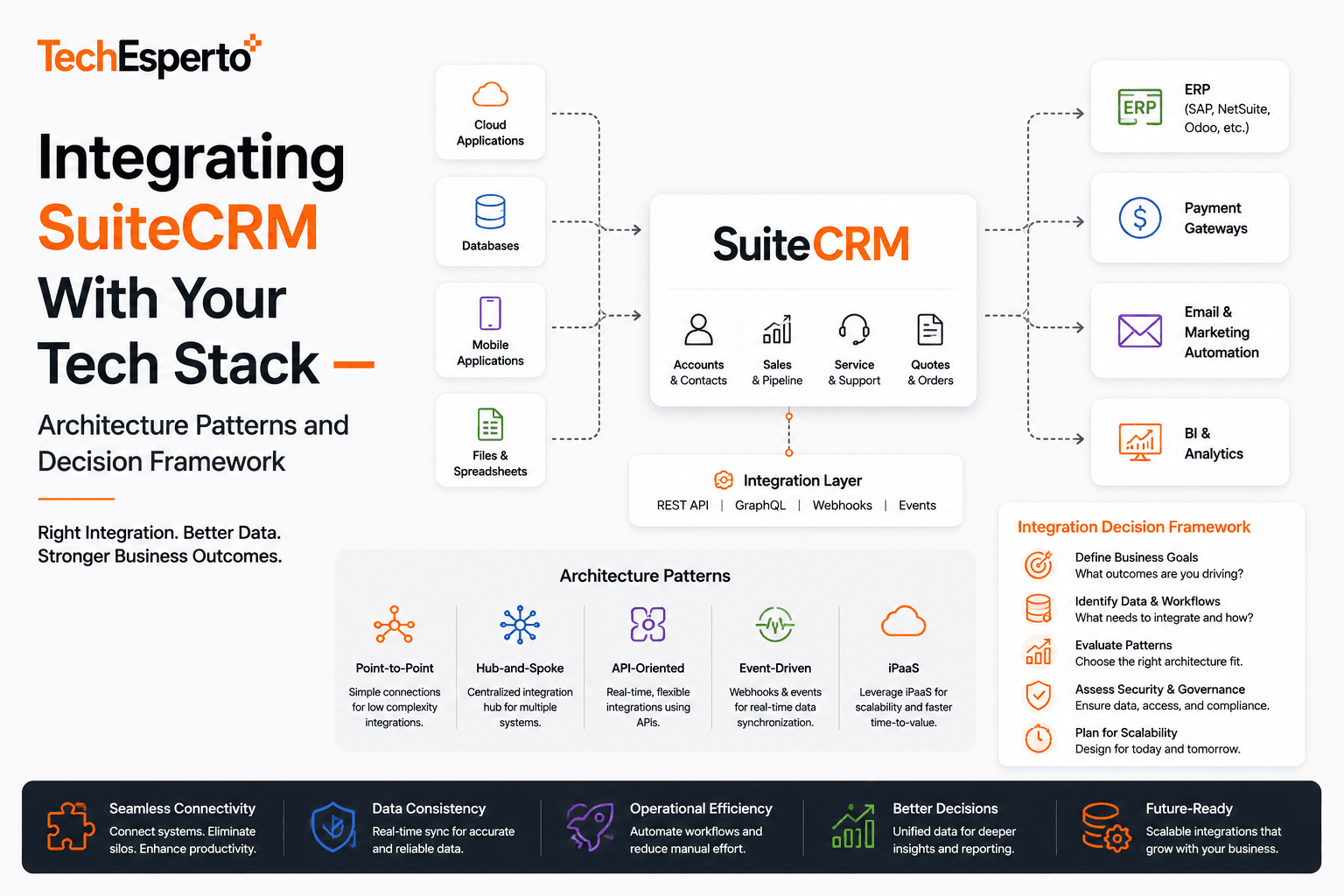
Most SuiteCRM integration architectures fall into one of four patterns. Each has tradeoffs that matter at scale.
Pattern 1: Direct Point-to-Point Integration
CRM connects directly to each other system via API calls. Simplest to start, hardest to maintain.
How it works:
- CRM triggers fire on data changes (custom logic hooks or scheduled jobs)
- Each integration is custom code calling each external API directly
- No abstraction layer between CRM and external systems
When it fits:
- Small deployments with 1–3 integrations
- Integrations that won’t change frequently
- Teams without engineering capacity to operate middleware
When it breaks:
- Above 4–5 integrations, the integration code becomes a maintenance burden
- Every external API change requires CRM-side code changes
- Failure handling and retry logic duplicated across each integration
- No central observability for integration health
Real cost: Direct integrations look cheap initially ($3K–$8K per integration). Maintenance cost grows linearly with integration count, plus debugging time when failures cascade. For deployments with 6+ integrations, total cost of ownership over 5 years often exceeds middleware approach by 40–60%.
See SuiteCRM Integration service and the SuiteCRM REST API Guide for direct integration patterns.
Pattern 2: Middleware-Based Integration
A dedicated middleware layer sits between CRM and external systems. All integrations route through middleware.
How it works:
- Custom middleware (Node.js, Python, Go) handles authentication, retries, error logging, data transformation
- CRM sends/receives standard messages to/from middleware
- Middleware translates between CRM and external system data models
- Centralized observability, error handling, monitoring
When it fits:
- Deployments with 4+ integrations
- Mission-critical integrations (ERP, payment, lending platform)
- Compliance environments requiring centralized audit logging
- Teams comfortable operating a custom service
When it breaks:
- Very small deployments where middleware overhead isn’t justified
- Teams without engineering capacity to maintain middleware
- Use cases where vendor APIs already provide adequate orchestration
Real cost: Higher upfront investment ($15K–$40K for middleware foundation). Lower ongoing cost as integrations scale — each new integration runs through existing middleware patterns rather than building from scratch. ROI typically appears around integration #4–5.
Pattern 3: Integration Platform as a Service (iPaaS)
Use a commercial iPaaS platform (Workato, Make, Zapier Enterprise, Boomi) as the integration layer.
How it works:
- iPaaS platform provides pre-built connectors for common systems
- Integrations configured rather than coded
- Vendor handles infrastructure, scaling, monitoring
- You pay subscription fees that scale with usage
When it fits:
- Teams without engineering capacity for custom middleware
- Integrations between common SaaS systems (Salesforce/HubSpot ecosystems, payment processors, marketing tools)
- Time-to-launch matters more than long-term economics
When it breaks:
- High-volume integrations where per-operation pricing compounds
- Complex transformations that require custom logic
- Compliance environments requiring deep audit control
- Specialized systems without pre-built connectors
Real cost: Low upfront cost. Ongoing subscription scales with integration count and volume — typically $500–$5,000/month depending on tier and usage. For high-volume deployments, costs can exceed custom middleware over 3-year horizons.
Pattern 4: Event-Driven Architecture With Message Queue
Asynchronous integration via a message queue (RabbitMQ, AWS SQS, Apache Kafka) between CRM and external systems.
How it works:
- CRM publishes events to message queue on data changes
- Consumer services subscribe to relevant events and act on them
- Loose coupling between CRM and external systems
- Failures isolated per consumer; queue persists messages
When it fits:
- High-volume deployments where synchronous integration creates performance issues
- Complex event flows requiring multiple downstream actions per CRM change
- Mission-critical reliability requirements where retry guarantees matter
- Teams with experience operating queue-based systems
When it breaks:
- Low-volume deployments where complexity isn’t justified
- Use cases requiring immediate synchronous responses
- Teams without queue operations experience
Real cost: Highest upfront engineering investment. Lowest per-event cost at scale. Becomes economically favorable in deployments above 100K events/day or with strict reliability SLAs.
For broader integration architecture context, see Top 10 SuiteCRM Integrations That Save Your Team 10 Hours a Week in 2026, REST API glossary entry, and webhook glossary entry.
Build vs Buy Integration Decisions
For each integration in your stack, you have a build vs buy decision. Three factors determine the right answer.
Factor 1: Does a Pre-Built Integration Exist?
For common SaaS systems (Slack, Google Workspace, Mailchimp, QuickBooks), pre-built integrations often exist. Buying is usually faster and cheaper than building unless customization needs are real.
For specific common integrations:
- Google Workspace: See SuiteCRM Google Workspace Integration
- QuickBooks: See SuiteCRM QuickBooks Integration and SuiteCRM QuickBooks Integration page
- Mailchimp: See SuiteCRM Mailchimp Integration
- WhatsApp/Twilio: See SuiteCRM WhatsApp Twilio Integration
- Azure: See Azure API Integration with SuiteCRM portfolio example
- Xero: See SuiteCRM Xero Integration portfolio example
- Contivio: See SuiteCRM Contivio Integration portfolio example
Factor 2: How Specific Are Your Requirements?
Standard data sync needs (contacts in CRM ↔ contacts in marketing tool) are usually handled fine by pre-built connectors. Specific requirements (custom field mappings, complex transformations, conditional logic) often require custom development.
The honest test: write down exactly what the integration needs to do. If the pre-built connector handles 95% of your requirements, buy it. If it handles less than 80%, building is usually better than fighting connector limitations.
Factor 3: What’s the Volume?
Pre-built integrations often charge per operation, per record sync, or per active connection. At low volume (under 10K operations/month), per-operation pricing is fine. At high volume, costs compound and custom integration becomes economically favorable.
The break-even is usually around 50K–100K operations/month. Above that scale, custom integration with proper middleware is typically cheaper than commercial iPaaS subscriptions.
Critical Integrations Worth Architectural Attention
Some integrations require more architectural care than others. Five integration categories worth treating as first-class architectural decisions.
Integration Category 1: ERP Integration
ERP-to-CRM is often the most expensive integration in a manufacturing or distribution deployment. Done well, it produces a single source of truth across operations. Done poorly, it produces ongoing reconciliation overhead that consumes operations team time forever.
Critical decisions:
- Direction of data flow (CRM → ERP, ERP → CRM, bidirectional)
- Master data ownership (who’s authoritative for what)
- Sync frequency (real-time, near-real-time, batch)
- Conflict resolution (what happens when both systems update the same record)
- Failure handling (ERP API downtime is common)
See Manufacturing CRM solutions, manufacturing CRM guide, and ERP glossary entry.
Integration Category 2: Payment Processor Integration
Payment integration touches customer financial data and compliance requirements. Architecture matters more than convenience.
Critical decisions:
- PCI scope (where card data lives, how to minimize PCI scope)
- Tokenization (use processor tokens rather than storing card data)
- Webhook handling (payment status changes async; CRM must handle reliably)
- Reconciliation (CRM transaction records must reconcile to processor reports)
For FinTech-specific patterns, see FinTech CRM guide and FinTech CRM solutions.
Integration Category 3: Marketing Automation Integration
Marketing-to-CRM integration drives funnel velocity. Architectural decisions affect attribution accuracy and lead routing reliability.
Critical decisions:
- Lead deduplication (multiple touches to same person should resolve to one lead)
- Attribution data preservation (source, campaign, medium captured and preserved through lifecycle)
- Real-time vs. batch (real-time enables fast lead routing; batch is simpler)
- Bidirectional sync rules (marketing tool updates contact preferences; CRM updates marketing engagement scores)
See marketing automation glossary entry, SuiteCRM Marketing Automation page, and lead scoring glossary entry.
Integration Category 4: Communication Platform Integration
Telephony, SMS, email, video — communication integrations need careful design because they affect rep productivity directly.
Critical decisions:
- Click-to-call vs. embedded softphone
- Recording handling (where calls are stored, compliance requirements)
- Activity logging (every communication logged in CRM with appropriate context)
- Failure modes (what happens when the comms platform is down)
See SMTP glossary entry, OAuth glossary entry, and SuiteCRM Email Configuration.
Integration Category 5: Data Warehouse Integration
CRM data flowing to a data warehouse (Snowflake, BigQuery, Redshift) enables analytics that CRM-native reporting can’t match. Architectural decisions affect both data quality and analytics latency.
Critical decisions:
- ETL vs. ELT (transform before or after warehouse load)
- Change data capture (log changes vs. full sync)
- Schema evolution handling (CRM fields change; warehouse schema must adapt)
- PII handling (some warehouse environments shouldn’t hold PII)
Common Architectural Mistakes
Five patterns we’ve seen repeatedly that produce production reliability issues.
Mistake 1: Synchronous Calls in User-Facing Flows
When a sales rep saves a record and the CRM needs to update three external systems before the save completes, every external system delay shows up as CRM latency. External API timeouts cascade into CRM UI freezes.
Better pattern: Decouple. Save the CRM record synchronously; fire async events to update external systems. Users get fast feedback; external systems update without blocking UI.
Mistake 2: No Retry Logic or Exponential Backoff
External APIs fail intermittently. Integrations without retry logic lose data when failures happen. Integrations with aggressive retry logic can hammer external systems during outages and make problems worse.
Better pattern: Exponential backoff (1s, 2s, 4s, 8s…) with maximum retry count. Move messages to dead-letter queue after max retries for manual investigation.
Mistake 3: No Idempotency
Operations that should happen once sometimes get triggered multiple times (network retries, duplicate webhook deliveries, manual reprocessing). Without idempotency, you get duplicate records, duplicate charges, duplicate notifications.
Better pattern: Every operation has a unique idempotency key. Receivers track keys they’ve processed; duplicates are no-ops.
Mistake 4: No Observability
When something goes wrong with an integration, the first 30 minutes are spent figuring out what happened. Without proper logging, distributed tracing, and metrics, debugging integration issues consumes engineering time disproportionately.
Better pattern: Structured logging on every integration call. Distributed tracing across CRM ↔ middleware ↔ external system. Metrics dashboards showing integration health (success rate, latency, error count by type).
Mistake 5: No Documented Integration Contracts
The integration that works fine for 18 months breaks when a developer leaves and someone needs to modify it. Without documented contracts (what data flows, what triggers it, what error states exist), modifications introduce regressions.
Better pattern: Each integration has documentation covering: triggers, payload schema, transformation rules, error handling, idempotency strategy, monitoring approach. Updated when the integration changes.
For broader CRM data quality and reliability context, see CRM Data Security and Compliance, SuiteCRM Performance Optimization, and SuiteCRM Logic Hooks Guide.
How to Plan Your Integration Architecture
Five-step planning framework for new deployments.
Step 1: Inventory All Integrations
List every system that will integrate with SuiteCRM. Categorize by integration depth (lookup-only vs. read-write vs. bidirectional sync). Categorize by criticality (mission-critical vs. nice-to-have).
Step 2: Map Data Flows
For each integration, map exactly what data flows in which direction, with what frequency, under what triggers. This surfaces conflicts (two systems both authoritative for same data) and edge cases before they become production problems.
Step 3: Decide Pattern Per Integration
Apply the four-pattern framework above to each integration. Most deployments end up with a mix — direct integration for simple sync, middleware for mission-critical integrations, iPaaS for SaaS-to-SaaS, event-driven for high-volume.
Step 4: Plan for Failure
For each integration, document: what happens when the external system is down, what happens when network connectivity fails, what happens when data shapes change unexpectedly. Failures will happen; planning for them upfront prevents 2am pages later.
Step 5: Build Observability Before Production
Logging, monitoring, alerting — built into the integration before it goes to production. The cost of adding observability later is dramatically higher than building it in from the start.
For a structured approach to integration scoping during implementation, see SuiteCRM Implementation service, SuiteCRM Implementation Best Practices, and SuiteCRM Implementation Cost Breakdown for 2026.
Industry-Specific Integration Considerations
Integration architecture priorities vary by industry.
Healthcare: EMR integration is the dominant concern. Patterns matter for HIPAA compliance. See Healthcare CRM solutions, healthcare CRM guide, and HIPAA glossary entry.
FinTech: Core platform integration (lending, payments, trading) plus KYC/AML provider integration plus regulatory reporting. SOC 2 architecture affects all integration decisions. See FinTech CRM solutions and FinTech CRM guide.
Manufacturing: ERP integration is the dominant concern. Distributor portal needs its own integration layer. See Manufacturing CRM solutions and manufacturing CRM guide.
E-commerce: Multi-channel integration (Shopify, Amazon, marketplaces) plus payment plus fulfillment plus accounting. High integration count makes middleware almost mandatory. See Ecommerce CRM solutions and SuiteCRM for Retail.
SaaS: Product integration (your own product ↔ CRM) is unique to your business. Standard SaaS tool integrations are commoditized. See SaaS CRM solutions.
Other industries: Real Estate CRM solutions, Insurance CRM solutions, Finance CRM solutions each have specific integration patterns worth evaluating.
Frequently Asked Questions
How many integrations is typical for a mid-market SuiteCRM deployment?
Typical: 5–9 integrations at launch, growing to 10–15 over 24 months. Common categories: email/communication, marketing automation, accounting, payment processing, helpdesk, document management, calendar, data warehouse, ERP (manufacturing/distribution).
What’s the most expensive integration we’d build?
Usually ERP integration (manufacturing, distribution) or core platform integration (FinTech). Both run $25,000–$60,000+ depending on complexity. See SuiteCRM Integration service for service ranges.
Should we use Workato/Boomi/Make instead of building custom?
For 1–5 integrations between common SaaS systems: usually yes, iPaaS is faster and cheaper. For mission-critical integrations or high-volume workflows: usually custom middleware is more reliable and cheaper at scale.
What about AI-powered integrations?
AI capabilities (lead scoring, email AI, chatbots) are themselves integrations — between SuiteCRM and AI providers (OpenAI, Anthropic, Google). Same architectural principles apply. See Complete Guide to AI for CRM in 2026, AI CRM Cost analysis, AI Lead Scoring Guide, AI Chatbots for CRM Lead Capture, AI in CRM 10x Sales Revenue, and AI for SuiteCRM service.
How do we handle integration testing?
End-to-end integration tests are essential but often skipped. At minimum: every integration should have happy-path tests, failure-mode tests, and idempotency tests. Run them in CI before deployment. Mock external systems for tests; use real systems for staging validation.
What happens during an integration outage?
Well-architected integrations degrade gracefully. CRM continues working; affected functionality queues or surfaces appropriate errors; reconciliation happens after external system recovery. Poorly architected integrations cascade failures into CRM unavailability. The difference is architectural discipline.
Should we use SuiteCRM webhooks for outbound integrations?
Yes, for most cases. Webhooks are simpler than custom logic hooks for outbound events. Logic hooks remain useful for complex transformations or when triggering events SuiteCRM doesn’t natively emit. See SuiteCRM Logic Hooks Guide, logic hooks glossary entry, and SuiteCRM Scheduler Cron Setup.
How do we handle authentication across integrations?
OAuth 2.0 for user-context integrations. API key with rotation policy for service-to-service. Avoid embedding credentials in code; use secrets management (AWS Secrets Manager, HashiCorp Vault, similar). See OAuth glossary entry.
What about real-time event streaming from SuiteCRM?
SuiteCRM doesn’t have native event streaming. The typical pattern is webhooks via logic hooks + message queue middleware. For high-volume event streaming, this works well; for very high volume (millions of events/day), custom architecture may be needed.
How do we get started with integration architecture planning?
Book a free 30-minute CRM strategy call — we’ll walk through your specific integration landscape and recommend an architectural approach. No pitch, no commitment.
For broader technical context: Build vs Buy CRM framework, Build vs Buy CRM for SaaS, SuiteCRM Customization Complete Guide, How to Build Custom Modules in SuiteCRM Complete Developer Guide, SuiteCRM Custom Fields Guide, CRM Vendor Lock-in Hidden Cost, our pricing page, services overview, engagement models, and technology stack.